Houston-Based. Nationwide Service.

Logo File Formats & Printing

Automatic Vector Tracing vs. Manual Logo Reconstruction

By the Logo In Hours design teamPublished November 23, 2026

Automatic tracing converts pixel edges into vector paths quickly, but it copies blur, jagged edges and mistakes and usually creates far too many anchor points. Manual reconstruction redraws the logo deliberately, producing cleaner geometry, correct lettering and files that are easy to edit.

Who this guide helps: Anyone deciding between an online converter, Illustrator’s image trace and a professional rebuild.

How automatic tracing works

Tracing software groups pixels of similar color, finds their boundaries and fits paths along them. Settings control how many colors and how closely paths follow edges.

A real comparison

Below, the same low-resolution image was run through a simple tracing algorithm and then rebuilt by hand. The traced version is genuinely vector but carries thousands of anchor points and keeps the misspelling.

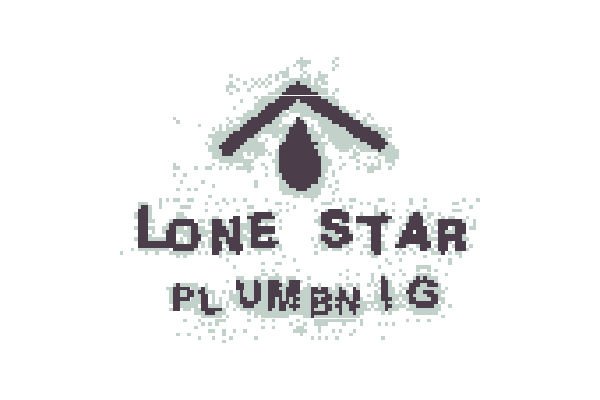
Step 1: low-resolution AI-generated PNG of the Lone Star Plumbing demonstration logo
1. Original AI imageRaster pixels. Misspelled word, drifting letters, soft edges.
Step 2: the same logo after automatic tracing, showing stair-stepped vector shapes
2. Automatic traceTechnically a vector file, but it contains 4,048 anchor points (27 KB). Every jagged pixel edge and every spelling mistake is preserved.
Step 3: professionally reconstructed vector version with corrected spelling and even lettering
3. Manual reconstructionBuilt from a handful of clean shapes and real type (0.8 KB). Spelling fixed, spacing even, every element editable.

The automatic trace above was produced by a simple tracing algorithm run on the low-resolution image, so the comparison is genuine. Commercial tracing tools produce smoother curves than this, but they share the same limitation: they copy what is in the pixels, including mistakes. Illustrative demonstration using a fictional business.

Where tracing works

  • Simple, high-contrast shapes from a clean, large source
  • Quick previews and mockups
  • Hand-drawn textures where irregularity is intended

Where tracing fails

  • Text (letters become blobs and keep errors)
  • Geometric shapes that should be perfect circles or straight lines
  • Low-resolution or compressed sources
  • Logos that must be edited later

What manual reconstruction adds

A designer uses the image as reference, rebuilds curves with minimal anchor points, matches or redraws the lettering, aligns elements on a grid and defines colors. Read more on our vector conversion and AI logo redesign pages.
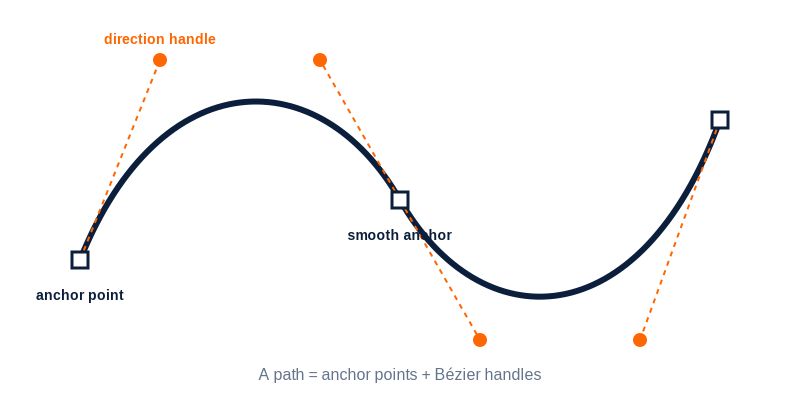
Manual reconstruction places anchor points only where a curve or corner needs one.
Manual reconstruction places anchor points only where a curve or corner needs one. Original illustration by Logo In Hours.

Tracing settings and their trade-offs

SettingHigher valueLower value
ColorsMore detail, more shapesCleaner but may merge areas
Path fidelityFollows every bumpSmoother but less accurate
CornersSharper cornersRounder, softer corners
Noise / minimum areaRemoves specksKeeps tiny artifacts

No setting can correct a misspelled word or decide what a blurry area should be.

Common mistakes

  • Tracing a tiny or compressed image.
  • Delivering a trace without cleaning up points.
  • Leaving text as traced shapes instead of real type.
  • Not checking outline view for overlapping fragments.

Sources and further reading

Logo In Hours publishes practical educational resources about logo design, artwork preparation, and branding. Content is prepared and reviewed by the Logo In Hours design team. Editorial standards.

FAQ

Frequently Asked Questions

Is Illustrator’s Image Trace manual reconstruction?

No. It is automatic tracing. Designers often use it as a starting point and then redraw.

How many anchor points should a logo have?

As few as needed to describe each curve accurately. Fewer, well-placed points produce smoother results and easier edits.

Keep learning

Related Guides

Convert an AI logo to vector

Read the guide →

Logo file formats explained

Read the guide →

Fix a blurry logo

Read the guide →

Browse the full Logo Design Learning Center →

Need a Clean Manual Rebuild?

Send us your file for a reconstruction quote.

Logo In Hours LLC

Request a Free Logo Consultation

Takes about a minute. A designer will contact you to talk through your logo idea — no upfront payment.
Service Needed / Servicio Necesario *
Prefer to talk now? Call 713-367-0919

Free Consultation • No Upfront Charge

Custom logo design, delivered the same day

  • Same-day custom logo concepts
  • Multiple concepts & revisions included
  • High-resolution & vector files (AI, SVG, PNG, PDF)
  • You keep full ownership of your logo
Prefer to talk? (713) 367-0919