Houston-Based. Nationwide Service.
Use PNG for everyday digital use where you need transparency, SVG for crisp web display and cutting machines, and EPS (or vector PDF) when a printer or sign vendor asks for vector artwork. PNG is pixel-based; SVG and EPS can hold scalable vector shapes.
Who this guide helps: Owners deciding which logo file to upload to a website, send to a printer or hand to a sign shop.
PNG stores a fixed number of pixels. SVG and EPS can store shapes as mathematical paths, which are redrawn at any size. That single difference explains almost every practical question below.
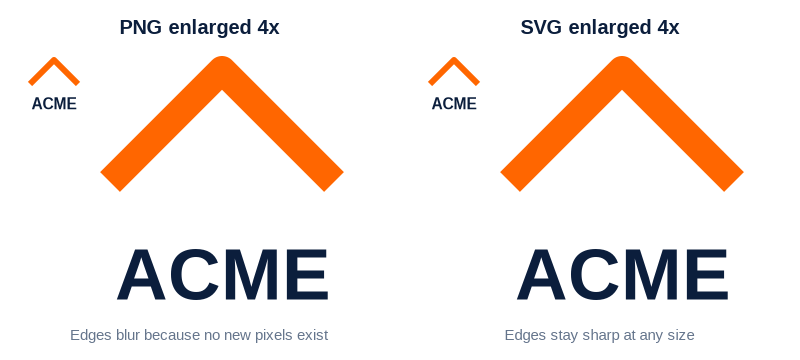
A 500-pixel PNG looks fine as a website header and terrible on a 4-foot banner. A properly built SVG or EPS looks identical at both sizes.
PNG supports transparent backgrounds, which is why it is the default for web and slides. SVG is transparent wherever no shape is drawn. EPS transparency depends on how the file was built and how the receiving software interprets it.
A simple logo as SVG is often only a few kilobytes and stays sharp on high-density screens. A PNG must be exported larger to look crisp on those screens, which increases file size. Some platforms (certain email clients and social networks) do not accept SVG, so keep a PNG too.
| PNG | SVG | EPS | |
|---|---|---|---|
| Type | Raster | Vector-capable | Vector-capable |
| Transparency | Yes | Yes | Depends |
| Best for | Web, slides, social | Websites, apps, cutting machines | Printers, sign and promo vendors |
| Opens in browsers | Yes | Yes | No |
| Edit shapes later | No | Yes, if built as vectors | Yes, if built as vectors |
Both can carry vector artwork. Many printers now prefer PDF because it embeds fonts and color information reliably and is easy to proof. Some sign and promotional-product vendors still list EPS first. When in doubt, send the format your vendor names in their artwork guidelines.
A simple naming pattern prevents mix-ups: business-logo-horizontal-color.svg, business-logo-stacked-black.eps, business-logo-icon-white.png. Anyone picking a file should know what it is without opening it.
Logo In Hours publishes practical educational resources about logo design, artwork preparation, and branding. Content is prepared and reviewed by the Logo In Hours design team. Editorial standards.